How To Get Free Historical Stock Data in Python

It’s recently become apparent to me that collecting somewhat good quality end-of-day stock price data has turned into a real pain, with today’s listed alternatives alternatives being somewhat lacking compared to what I had used a few years ago for my bachelor thesis project on algorithmic trading.
Which is why I decided to write a script to do this for fun and profit. Here is what I learned along the way.
The first thing that pops up when you search for AAPL on DuckDuckGo is Yahoo Finance. Yahoo has been providing stock date for quite a long time now, and used to provide an easy way to retrieve end-of-day data in the past, however since the last few years this has no longer been the case.
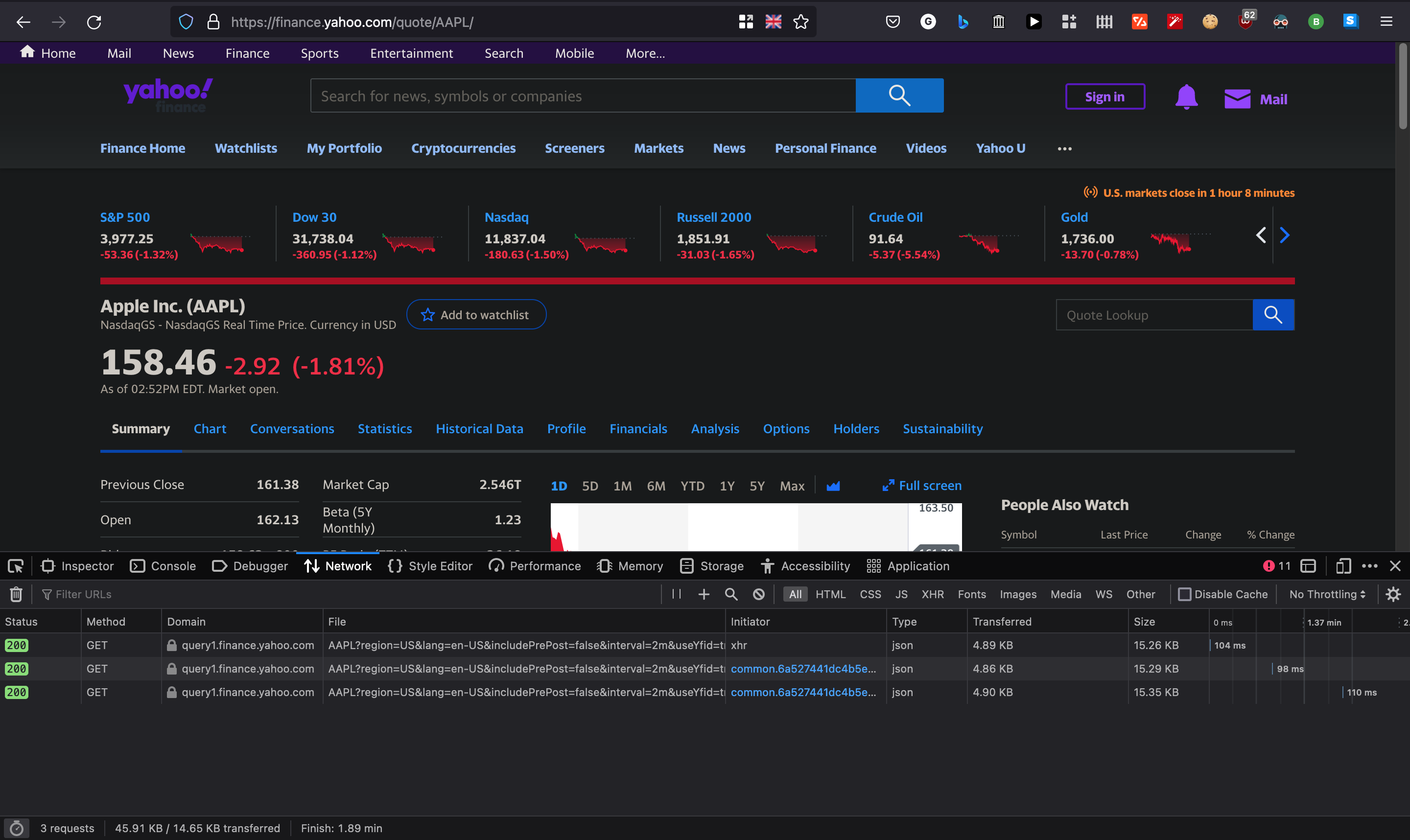
Glancing at the network tab in my browser’s developer tools, I can see that my browser has made a GET request to Yahoo Finance for AAPL ticker with a few other options.
Diving deeper into this GET request, I can see that Yahoo Finance returned some data in its response.
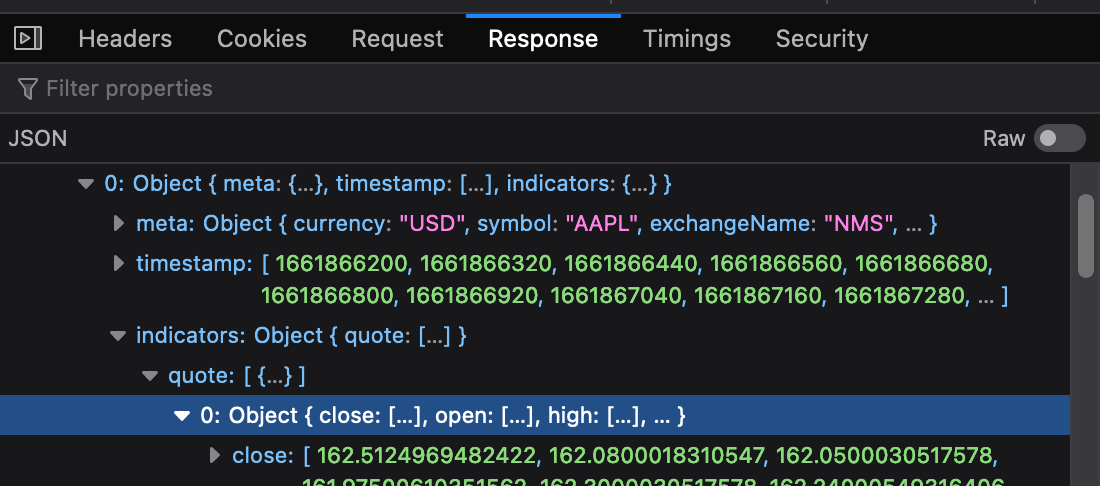
And opening the particular request in a new tab allows me to view the full response and save it to a JSON file should I wish to do so.
This would of course be quite tedious to do for each symbol we’re interested in, for each day. What if we could automate this process and transform the data into a structured format such as a DataFrame for further wrangling?
Yahoo Finance has a dedicated “Historical Data” tab, navigating to the page provides us with a handy download button. This would hopefully make it somewhat easier to retrieve the full history for one particular symbol. The URL behind this button is as follows:
- https://query1.finance.yahoo.com/v7/finance/download/ -> base URL
- AAPL -> symbol
- ?period1=1630328849 -> period start
- &period2=1661864849 -> period end
- &interval=1 -> frequency of data
- d&events=history -> type of Yahoo Finance event
- &includeAdjustedClose=true -> whether to include adjusted close figures
At first glance this API looks quite straight forward, we just have a few questions.
- Can I pass multiple symbols in the same API GET request?
- When kind of date range is
1630328849:1661864849? - Can I get a list of symbols?
The date ranges are in Unix time, which is a system in computing for describing a point in time. Since we’re not computers, this means that we’ll need a way to convert dates to Unix time.
The Yahoo Fiance API doesn’t seem to care if there’s is now data for a particular date and will simply return data for a date range which it has. This works great for us, which is why I used 01/01/1970 as a default start date.
Lucky for us, Python provides a module to convert such a date.
from datetime import datetime, timezone

dt_start = int(datetime(1970, 1, 1, 0, 0, 0, 0, tzinfo=timezone.utc).timestamp())
dt_end = int(datetime.now().timestamp())
After a quick Google search, I found some US stock symbols that we could use to test this. It’s a simple text file with symbols separated by line breaks.
Our plan would be to read the contents of this file and write it to a file on our disk.
 url = "https://github.com/rreichel3/US-Stock-Symbols/raw/main/all/all_tickers.txt"

tickers = urllib.request.urlopen(url).read().decode("utf-8").split("\n")

with open("data/processed/tickers.csv", 'w', newline='') as f:
    wr = csv.writer(f)
    wr.writerow(tickers)
Full source code
import urllib.request
import pandas as pd
from datetime import datetime, timezone
import logging
import time
import random
import csv
import os

# Set up logging so you can see what is happening
logging.basicConfig(
    level=logging.INFO,
    format="%(asctime)s - %(levelname)s - %(message)s",
    handlers=[logging.FileHandler("stock_data.log"), logging.StreamHandler()]
)
logger = logging.getLogger(__name__)


class StockTicker:
    def __init__(self, symbol: str, start: int, end: int, interval: str, events: str, adjust_close: bool) -> None:
        self.base = "https://query1.finance.yahoo.com/v7/finance/download/"
        self.symbol = symbol
        self.start = start
        self.end = end
        self.interval = interval
        self.events = events
        self.adjust_close = adjust_close
        self.url = self._url_builder()
        self.file = None

    def _url_builder(self):
        return (
            self.base +
            self.symbol + '?' +
            f"period1={self.start}" + '&' +
            f"period2={self.end}" + '&' +
            f"interval={self.interval}" + '&' +
            f"events={self.events}" + '&' +
            f"includeAdjustedClose={self.adjust_close}"
        )

    def save(self) -> 'StockTicker':
        os.makedirs("data/raw", exist_ok=True)
        self.file, self.headers = urllib.request.urlretrieve(
            self.url, f"data/raw/{self.symbol}.csv"
        )
        return self

    def read(self) -> pd.DataFrame:
        df = pd.read_csv(self.file, parse_dates=["Date"])
        df.columns = [s.lower().replace(' ', '_') for s in df.columns]
        df["symbol"] = self.symbol
        return df


def get_tickers():
    url = "https://github.com/rreichel3/US-Stock-Symbols/raw/main/all/all_tickers.txt"
    tickers = urllib.request.urlopen(url).read().decode("utf-8").split("\n")
    tickers = [t.strip() for t in tickers if t.strip()]

    os.makedirs("data/processed", exist_ok=True)
    with open("data/processed/tickers.csv", 'w', newline='') as f:
        wr = csv.writer(f)
        wr.writerow(tickers)

    return tickers


# Date range: from the beginning of time (well, 1970) to now
dt_start = int(datetime(1970, 1, 1, 0, 0, 0, 0, tzinfo=timezone.utc).timestamp())
dt_end = int(datetime.now().timestamp())

tickers = get_tickers()
all_data = []

for symbol in tickers:
    try:
        logger.info(f"Processing {symbol}")

        df = StockTicker(
            symbol=symbol,
            start=dt_start,
            end=dt_end,
            interval="1d",
            events="history",
            adjust_close=True
        ).save().read()

        logger.info(f"  -> {len(df)} rows")
        all_data.append(df)
    except Exception as e:
        logger.error(f"  -> Unable to retrieve {symbol}: {e}")

    # Be polite to Yahoo. Rate limit between requests.
    time.sleep(random.uniform(1, 3))

# Concatenate all DataFrames at once (much faster than repeated concat)
df_tickers = pd.concat(all_data, ignore_index=True)
df_tickers.to_csv(f"data/processed/tickers-{dt_end}.csv", index=False)
logger.info(f"Done! Saved {len(df_tickers)} rows for {len(tickers)} tickers.")
Caveats
A few things to keep in mind before you run this:
Yahoo’s API is unofficial and can break. The v7/finance/download/ endpoint is not a public API. Yahoo has changed it before and could change it again. If your script stops working, check whether the endpoint has moved. There are also paid alternatives like Alpha Vantage or Polygon, but they come with rate limits and costs.
This takes a while. You are downloading data for thousands of tickers, each with years of daily data. The script includes a random sleep between 1 and 3 seconds between requests to be polite to Yahoo’s servers. On my machine it took about 4 hours. If you need all the data, you might want to run it overnight.
Not all tickers are valid. The US stock symbols file includes delisted companies, symbols with special characters, and some edge cases that Yahoo will reject. The script handles failures gracefully, but expect some errors in the logs.
Adjusted close matters. I set adjust_close=True because it accounts for stock splits and dividends, giving you a more accurate picture of historical returns. If you are doing backtesting, this is essential.
What next?
Once you have this data, you can do all sorts of interesting things:
- Backtest trading strategies. Pair this with backtrader or zipline for backtesting.
- Visualise price movements. Use matplotlib or plotly to chart price trends.
- Build a portfolio tracker. Combine multiple tickers and track performance.
- Calculate correlations. See how different stocks move in relation to each other.
The data is free. The rest is up to you.